Mx Keys Mini First Look: Unboxing and Impressions
The landscape of productivity peripherals has shifted dramatically over the last few years, moving away from bulky, wired desktop setups toward streamlined, minimalist workstations that prioritize portability and desk aesthetics without sacrificing tactile performance. Logitech has consistently led this charge with its Master Series, a lineup of hardware specifically engineered for creators, coders, and office professionals. When the original MX Keys was released, it set a gold standard for membrane-style typing with its spherically dished keys and heavy, premium build. However, as the trend toward "60 percent" and "70 percent" layout keyboards intensified, users began demanding a more compact version of that same experience. The MX Keys Mini is the direct answer to those requests, distilling the core essence of its larger sibling into a chassis that occupies significantly less desk real estate.
This first look explores the unboxing experience and initial impressions of the Logitech MX Keys Mini. It is designed for those who find the standard full-sized keyboard too wide—often leading to ergonomic strain as the mouse is pushed too far to the right—or for those who simply want a premium typing tool that can easily slide into a laptop sleeve. In the category of high-end electronics, specific attention must be paid to how a device feels under the fingers, how it integrates into a multi-device workflow, and whether the trade-offs necessitated by its smaller form factor are worth the investment for the serious professional.
Unboxing and Physical Presence
Logitech has refined its packaging to reflect a modern, eco-conscious approach. Upon opening the box, the MX Keys Mini is presented immediately, wrapped in a thin, protective layer of sustainably sourced paper rather than plastic. The weight of the box is the first hint that this is not a budget peripheral; even in its "Mini" form, the keyboard has a substantial heft due to its single-plate metal construction. This weight is a critical feature for buyers who care about stability. Many compact keyboards tend to slide around during vigorous typing sessions, but the MX Keys Mini remains firmly anchored to the desk.
Inside the box, the accessories are sparse but functional. Aside from the keyboard itself, you find a USB-C to USB-C charging cable and basic documentation. It is important to note for potential buyers that the MX Keys Mini does not include a Logi Bolt USB receiver in the box, though it is fully compatible with one. Logitech is leaning heavily into Bluetooth Low Energy (BLE) for this model, assuming that most modern laptops and tablets have robust enough Bluetooth stacks to handle the connection without a dedicated dongle. For users working in high-interference environments or those using older desktop hardware without Bluetooth, a separate purchase of a Bolt receiver might be necessary, though for most, the out-of-the-box Bluetooth experience is the intended path.
The design language is unmistakable. The keyboard features a low-profile silhouette with the signature "Perfect Stroke" keys. These keys are characterized by a circular indentation in the center of each cap, designed to guide the fingertips to the center of the key and reduce mistypes. The finish is a matte coating that feels soft to the touch but appears resilient enough to resist the "shine" that often plagues cheaper ABS plastic keycaps after a few months of heavy use. The unit is available in several colorways—graphite, pale gray, and rose—allowing it to blend seamlessly into either a clinical office environment or a vibrant creative studio.
Detailed Product Analysis: Ergonomics and Typing Experience
The primary draw of the MX Keys Mini is its layout. By removing the dedicated number pad, Logitech has shortened the device considerably. From an ergonomic standpoint, this is a significant advantage. A full-sized keyboard forces the user's "mouse arm" into an abducted position, reaching outward to clear the number pad. The Mini allows the mouse to be placed much closer to the center of the body, keeping the shoulders in a more neutral, relaxed position. For professionals who spend eight to twelve hours a day at a desk, this change alone can mitigate repetitive strain issues in the shoulder and neck.
The typing mechanics are identical to the full-sized MX Keys, which is to say they are among the best in the non-mechanical category. The scissor-switch mechanism provides a tactile bump that is distinct and satisfying, without the loud "click" of mechanical switches that might disturb colleagues in an open-office plan or family members in a home setting. The travel distance is shallow but surprisingly communicative. You feel exactly when a key has been registered, allowing for high-speed typing with minimal effort. This is particularly beneficial for writers and coders who rely on a consistent rhythm to maintain their flow state.
Shop the latest Electronics picks on Amazon.
Shop Amazon →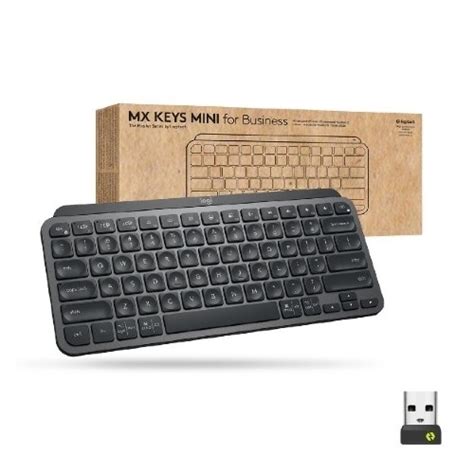
Smart illumination is another cornerstone of the MX Keys Mini experience. Proximity sensors detect when your hands approach the keyboard, fading the backlighting on before your fingers even touch the keys. The brightness adjusts automatically based on the ambient lighting conditions of the room. This isn't just a flashy aesthetic choice; it's a battery-saving measure. In a brightly lit office, backlighting is unnecessary and wastes power; in a dimmed room, it is essential. For users who prefer manual control, the brightness can be adjusted via the function row. While the backlight is limited to white light—no RGB here—it fits the professional, "adult" aesthetic of the Master Series perfectly.
Customization and Software Integration
The MX Keys Mini's hardware is only half of the story. The software integration via the Logi Options+ app allows for a high degree of tailoring. The function row has been updated with several new defaults that reflect current communication trends. There is a dedicated "Emoji" key, a "Mute/Unmute" microphone button, and a "Dictation" key. While some traditionalists might miss the standard F-keys being the primary function, these can be toggled in the software. Most modern users will likely find the microphone mute button especially useful for the era of constant video conferencing.
Perhaps the most powerful software feature is Logitech Flow. If you use the MX Keys Mini alongside an MX Master 3S mouse, you can move your cursor across up to three different computers (even between Windows and macOS) and the keyboard will follow the mouse. This allows for seamless copying and pasting of text, images, and files between machines. This use case is specifically relevant for developers who might have a MacBook for coding and a Windows PC for testing, or for creative professionals who use a desktop for rendering and a laptop for client meetings. The ability to manage multiple devices from a single keyboard with the press of a button (via the three Easy-Switch channels) remains one of the strongest selling points for this ecosystem.
Comparison and Considerations
When choosing a compact keyboard, buyers often weigh the MX Keys Mini against both mechanical options and other membrane-based competitors. It occupies a middle ground: it offers more travel and tactile feedback than a standard laptop keyboard or an Apple Magic Keyboard, but it lacks the deep travel and customizability of a mechanical keyboard like the Logitech MX Mechanical Mini. The choice usually comes down to whether the user prefers the silent, "thall" sound of a premium membrane or the "clack" of switches.
Comparison Table: MX Keys Mini vs. Competitors
| Feature | MX Keys Mini | Apple Magic Keyboard | MX Mechanical Mini |
|---|---|---|---|
| Switch Type | Scissor/Membrane | Scissor/Membrane | Low-Profile Mechanical |
| Backlighting | Auto-Adjusting White | None | Adjustable White |
| Multi-Device | 3 Devices (Easy-Switch) | 1 Device (Native) | 3 Devices (Easy-Switch) |
| Charging | USB-C | Lightning/USB-C | USB-C |
| Battery Life | 10 Days (Backlight On) | ~1 Month | 15 Days (Backlight On) |
| Build Material | Aluminum Top Plate | Aluminum Chassis | Aluminum Top Plate |
Pros and Cons
Every product involves a series of trade-offs. The MX Keys Mini is a highly specialized tool that prioritizes portability and desk space, which inherently creates some limitations for specific user groups.
- Pro: Exceptional Build Quality. The metal plate prevents any flexing, making the keyboard feel like a solid block of technology.
- Pro: Intelligent Lighting. The proximity sensors are genuinely useful and help the battery last longer in varied lighting conditions.
- Pro: Space Efficiency. The ultra-compact footprint is perfect for small desks or "coffee shop" setups where space is at a premium.
- Pro: Fast Switching. The ability to jump between a phone, a tablet, and a PC with almost zero latency is a productivity game-changer.
- Con: No Unifying Receiver Compatibility. It uses the newer Logi Bolt standard, meaning old Logitech Unifying dongles will not work.
- Con: Battery Life with Backlighting. Ten days of battery life is respectable, but compared to non-backlit keyboards that last for months, it requires more frequent charging if you leave the LEDs on high.
- Con: Lack of Adjustable Incline. The keyboard has a fixed typing angle. While it is set at a comfortable 6-degree slope, users who prefer a flat or a much steeper angle have no way to adjust it.
Buying Guide: Is the MX Keys Mini Right For You?
Determining whether to purchase the MX Keys Mini depends largely on your specific workflow and your existing hardware ecosystem. Because it is a premium product with a corresponding price point, it is not necessarily the right choice for a casual user who only types occasionally. However, for certain personas, it is an essential tool.
The Remote Professional
If you split your time between a home office, a corporate headquarters, and local cafes, the MX Keys Mini is ideal. It is small enough to fit into most laptop bags without adding excessive bulk, providing a consistent typing experience regardless of where you are working. Using a laptop’s built-in keyboard for long periods can be taxing; having a dedicated, high-quality peripheral that travels easily is a major ergonomic upgrade.
Looking for the best Electronics deals on Amazon?
See Deals →The Multi-Device Power User
For those who use an iPad Pro for design work but a PC for administrative tasks, the MX Keys Mini shines. The dedicated keys for switching between devices are located at F1, F2, and F3, making it incredibly fast to pivot. If you frequently find yourself typing long emails on your phone or tablet, this keyboard effectively turns those devices into miniature workstations.
The Minimalist Enthusiast
If your priority is a "clean" desk setup, the MX Keys Mini is visually striking. Its low profile doesn't dominate the desk, and the lack of wires (thanks to reliable Bluetooth connectivity) keeps your workspace looking organized. It pairs aesthetically very well with modern hardware from Apple, Microsoft, and Dell.
Who Should Skip It?
Accountants, data entry specialists, and anyone whose primary job involve heavy numerical input will likely find the lack of a number pad frustrating. While you can buy a separate number pad, it defeats the purpose of the integrated "Mini" design. Furthermore, gamers might find the 125Hz polling rate of Bluetooth insufficient for competitive play, as this is firmly a "productivity-first" device. In such cases, the full-sized MX Keys or a dedicated mechanical gaming keyboard would be a better fit.
Final Impressions
The MX Keys Mini feels like a product that has been honed based on years of user feedback from the original Master Series. It doesn't try to reinvent the wheel; rather, it takes a successful formula and optimizes it for a different set of physical constraints. The typing experience is remarkably consistent—firm, quiet, and rapid. While the transition away from the Unifying receiver might cause some initial friction for long-time Logitech users, the move toward the more secure and stable Logi Bolt and BLE standards is a necessary step for future-proofing.
Ultimately, the MX Keys Mini succeeds because it addresses the core "buyer cares" in the electronics market: build quality, ease of use, and ergonomic benefit. It feels like a piece of professional equipment rather than a disposable plastic accessory. For the professional who values the tactile sensation of their tools and needs to maintain a high level of output across several devices, the MX Keys Mini is a compelling, high-performance solution that proves that sometimes, less truly is more. It represents a mature evolution in keyboard design, focusing on the essentials of human-computer interaction and delivering them in a package that is as beautiful as it is functional.